If there is one field that is the most affected by LLMs, it has to be search. LLMs have completely rewired how we search and consume information from web.
LLMs are great on their own, but their built-in knowledge is not enough when you are building agents that need current information. You need a way to give them fresh web data, structured results, citations, and enough context to make better decisions.
This is where AI search engine APIs comes in.
These APIs give LLMs a structured way to search the web and retrieve up-to-date information in a format they can actually use.
What Makes a Good AI Search API Tool in 2026
A good AI search API in 2026 should feel like it was built for agents, not just for traditional software programs.
First, it needs fresh data. If your agent is answering questions about pricing, docs, product updates, regulations, news, or company information, stale results can make the whole workflow unreliable. You want an API that can pull in current information and make it clear where that information came from.
It also needs strong retrieval quality. Your agent should be able to send natural language queries and get useful results back without you having to over-engineer every prompt or query. The API should understand what the agent is trying to find, even when the question is long, messy, or slightly vague.
Then there is structured output. As a developer, you do not want to spend extra time cleaning the response before your agent can use it. A good API should return predictable fields like titles, URLs, snippets, content, dates, rankings, and metadata. That makes it easier to plug search into agent workflows, RAG pipelines, research tools, and production apps.
Speed matters too. Agents often make several tool calls before they complete a task. If every search call is slow, the whole experience starts to drag. The best tools are fast, consistent, and reliable even when your agent is running more complex workflows.
You also need source transparency. It is not enough for an agent to give an answer. You need to know where that answer came from. APIs that return citations, links, and source details make it easier to build products users can trust.
Finally, you need control. That means clear pricing, sensible rate limits, filtering options, domain controls, safe search settings, and predictable behavior. When you are building for production, these things matter just as much as answer quality.
In short, the best AI search engine API tools for agents in 2026 are the ones that help your agents search the web quickly, use fresh information, return structured results, and back up their answers with sources.
Categories of AI Search Tools
Before you compare specific tools, it helps to know what kind of AI search tool you actually need.
Not every AI search product is built for the same job. Some are made for people who want quick answers. Some are built for developers who need APIs for agents and apps. Others are better for crawling websites, extracting data, or searching across internal company knowledge.
For developers building agents in 2026, these are the main categories you will usually see:
Consumer AI search engines
Built for everyday users who want quick answers, summaries, and explanations.
Useful for personal research.
Usually not the best fit when you need a programmable search layer for an agent.
Developer-focused search APIs
Built for apps, agents, and AI workflows.
Give LLMs a structured way to search the web and retrieve up-to-date information.
Usually return useful fields like URLs, snippets, page content, metadata, and citations.
This is the most relevant category when you are building agentic systems.
Crawling and data extraction tools
Used when your agent needs more than a basic search result.
Help collect, clean, parse, and structure data from websites.
Useful for product data, documentation, pricing pages, market data, and large-scale web content.
Research and knowledge tools
Built for deeper research and longer answers.
Useful when your agent needs to compare sources, cite references, or investigate a topic across multiple pages.
Better suited for research-heavy workflows than simple lookup tasks.
Enterprise search platforms
Built for teams that need to search across internal company data.
Can connect to documents, wikis, tickets, chats, CRM data, codebases, and cloud storage.
Useful when your agent needs private company context, not just public web results.
The main thing to remember is that “AI search” is not one single category. If you are building agents, you usually start with a developer-focused search API, then add crawling, extraction, or enterprise search depending on what your agent needs to do.
AI Search Tools Compared
Here is a quick side-by-side comparison of the most popular AI search tools in 2026, highlighting their purposes, features, and who they are best suited for.
Tool | Best For | Live Web Access | Answer Style | Developer / API-First | Privacy Focus | Ease of Use |
|---|---|---|---|---|---|---|
Exa | AI builders, agents, RAG systems | Yes | Structured, intent-based | Yes | Medium | Medium |
Tavily | AI agents & workflows | Yes | API-ready, structured | Yes | Medium | Medium |
Firecrawl | Web data crawling & extraction | Yes (via crawl) | Raw structured data | Yes | Low | Medium |
Perplexity | Everyday search & research | Yes | Chat & concise with sources | Limited | Medium | High |
You.com | Privacy-aware users | Yes | Mixed (chat + links) | Limited | High | High |
Serp Tools | Developers needing raw results | Yes | Raw search results | Yes | Depends on setup | Medium |
Brave Search API | Privacy-centric products | Yes | Search output only | Yes | High | Medium |
Phind | Developers & coders | Yes | Code-oriented, explainer style | Limited | Medium | High |
Andi | Visual, everyday users | Yes | Card-style summaries | No | High | High |
Parallel AI Search | Agents, research systems, complex queries | Yes | Aggregated from parallel searches | Yes | Medium |
Best AI Search Engine Tools for 2026
Here are the AI search tools that are setting the standard in 2026, each solving search in a different way depending on who it is built for.
1. Exa
Exa AI Search API is a modern web search engine built for AI workflows. Instead of returning a simple list of links, it lets your agent or LLM search the web, extract context, and get structured, up‑to‑date information that you can feed directly into a workflow.
Exa is built from scratch for AI use cases, meaning it is optimized for relevance, freshness, and semantically‑driven results rather than click‑based ranking. It supports multiple search depths and is designed to serve as the retrieval layer in agentic applications or RAG systems.
Exa is used by thousands of developers and teams, including major developer tools and enterprise players. Some of the notable companies and products using Exa for search or agent grounding include Cursor, Databricks, AWS, Notion, Vercel, HubSpot, Monday.com, and others who integrate it into research, context retrieval, and AI products.
What Exa Offers in Terms of Search Functionality
Real-time web search with semantic embeddings and ranking for relevance.
Multiple search types (instant, fast, auto, deep, deep-reasoning) that trade off latency and depth.
Token-efficient highlights from pages (dense extracts ideal for LLM context).
Structured outputs and custom schemas so your agent can extract JSON directly from search results.
Answer API that returns direct answers with citations.
Contents extraction (full page text and parsed HTML).
Category-specific search like people, companies, research papers, news, PDF content, and code indexes.
Web crawling for deeper workflows, not just surface search.
Pros and Cons
Pros
Semantics-driven search that picks up meaning more than keyword matching.
Multiple search quality modes for tuning speed or depth.
Structured JSON outputs and highlights that fit straight into agents or RAG systems.
Up-to-date web data with real web content.
Useful verticals like code search, companies, people, and research papers.
Cons
Coverage or relevance can be inconsistent in niche use cases.
Cost can add up in deep search or multi-query workflows.
Results quality for certain niche content might vary compared with consumer-grade engines.
Ideal for
Agents needing fresh web context and structured outputs.
RAG workflows requiring high-quality retrieval and citations.
Apps that need to balance speed vs. depth of search.
Developers who want native JSON results without custom scraping.
Less ideal for
Basic keyword lookup with no structural output needs.
Extremely cost-sensitive workloads where minimal search is enough.
Pricing
Here's the pricing for Exa AI
1,000 free requests per month to get started.
Search (up to 10 results): ~$7 per 1,000 requests.
Deep Search (structured, multi-step): ~$12 per 1,000 requests.
Deep-Reasoning (higher synthesis quality): ~$15 per 1,000 requests.
Answer endpoint: ~$5 per 1,000 requests.
Contents extraction (full pages): ~$1 per 1,000 pages.
Enterprise plans with custom rate limits, security controls, and support are available.
Code Example
Python
from exa_py import Exa

exa = Exa(api_key="YOUR_API_KEY")

result = exa.search(
  "latest breakthroughs in renewable energy",
  type="auto",
  contents={"highlights": True}
)

print(result)
JavaScript
import Exa from "exa-js";

const exa = new Exa("YOUR_API_KEY");

const result = await exa.search("latest breakthroughs in renewable energy", {
  type: "auto",
  contents: { highlights: true },
});

console.log(result);
cURL
curl -X POST "https://api.exa.ai/search" \
  -H "Content-Type: application/json" \
  -H "x-api-key: YOUR_API_KEY" \
  -d '{
    "query": "latest breakthroughs in renewable energy",
    "type": "auto",
    "contents": { "highlights": true }
  }'
2. Tavily
If Exa gave you semantic search with flexible structured results, Tavily approaches the problem from a practical developer and enterprise angle.
Another well‑known search API in the space, it’s built around aggregating and processing content from multiple sites in one call, filtering and ranking results, and returning snippets that are already optimized for LLMs.
It acts as a programmable search and content extraction layer that plugs directly into LLM workflows, crawling, structured data retrieval, and research pipelines..
You can explore the full API docs here: https://docs.tavily.com
What Tavily Offers in Terms of Search Functionality
Real‑time web search optimized for AI agents
Aggregates content from multiple sites per query and scores it for relevance
Filters and ranks sources to reduce noise
Snippets and content chunks ready for LLM context windows
Multiple search depth options (basic, fast, advanced, ultra‑fast)
Optional LLM‑generated answers inside search results
Domain filters, time range filters, topic tags, and custom source controls
Secure API key authentication and usage governance for team environments
Extract and crawl endpoints to support larger agent pipelines
Pros and Cons
Pros
Built specifically for agent workflows and LLM integration
Flexible search depth modes let you balance cost and performance
Structured snippets reduce the need for post‑processing
Secure keys and governance features make it easier to build team‑driven apps
Free tier lets you experiment before committing
Cons
Credit usage can grow quickly for frequent or deep searches
Filtering and tuning parameters require some experimentation
Result quality may vary for very niche, technical content
Ideal For
Developers building agents and RAG systems that need structured search output
Teams that want control over query behavior, domain filters, and usage governance
Apps that need integrated search, extraction, and crawling in one API layer
Less Ideal For
Basic keyword lookup with minimal processing needs
Extremely cost‑sensitive products with very high query volumes
Pricing
Tavily uses a credit‑based model:
Free: 1,000 API credits per month
Pay‑as‑you‑go: ~ $0.008 per credit
Monthly plans: tiered from approx $30 to $500/month
Researcher: 1,000 credits (free)
Project: ~4,000 credits ($30)
Bootstrap: ~15,000 credits ($100)
Startup: ~38,000 credits ($220)
Growth: ~100,000 credits ($500)
Enterprise: custom pricing and rate limits
Search credits depend on search depth:
Basic, fast, ultra‑fast searches use 1 credit
Advanced searches use 2 credits per call
Pricing page: https://www.tavily.com/pricing
API credits guide: https://docs.tavily.com/guides/api-credits
Code Example
Python
from tavily import TavilyClient

client = TavilyClient(api_key="tvly-YOUR_API_KEY")

response = client.search(
  query="latest AI research breakthroughs",
  search_depth="basic",
  include_answer=True
)

print(response)
JavaScript
import { tavily } from "@tavily/core";

const client = tavily({ apiKey: "tvly-YOUR_API_KEY" });

const response = await client.search({
  query: "latest AI research breakthroughs",
  search_depth: "basic",
  include_answer: true
});

console.log(response);
cURL
curl -X POST "https://api.tavily.com/search" \
  -H "Content-Type: application/json" \
  -H "Authorization: Bearer tvly-YOUR_API_KEY" \
  -d '{
    "query": "latest AI research breakthroughs",
    "search_depth": "basic",
    "include_answer": true
  }'
3. Firecrawl
Firecrawl is a crawling and content extraction API built for workflows where you need deep, structured access to web content rather than just surface search results.
If your agent or pipeline needs to go beyond simple lookup queries and actually pull, clean, and organize content from sites at scale, Firecrawl gives you tools to do just that. It combines crawling, scraping, parsing, and cleaning into one platform so your applications can work with reliable, normalized data instead of messy HTML or unstructured blobs.
Firecrawl treats web crawling and extraction as first‑class citizens. It isn’t just running a search query and returning snippets. Instead, it can fetch entire pages or site sections, extract specific fields, and output clean, usable content that you can feed directly into LLMs, knowledge bases, or indexing pipelines.
Developers and teams building competitive intelligence platforms, research tools, price monitoring systems, and advanced agent workflows that depend on consistent content structure rather than surface search hits often choose Firecrawl.
What Firecrawl Offers in Terms of Search and Extraction Functionality
Distributed web crawling with domain or sitemap‑based targeting
Page fetch and content extraction with custom selectors and field rules
Normalized structured output ready for RAG systems or databases
Deduplication and noise reduction to avoid redundant content
Scheduling and rate control for large crawl jobs
Proxy management and anti‑bot handling for better crawl success
Integration‑friendly JSON results with metadata for provenance and source tracking
Pros and Cons
Pros
Excellent for workflows needing deep extraction and structured content
Scales to large crawl jobs without building your own infrastructure
Normalized output saves time on custom parsing
Supports scheduling, deduplication, and crawl optimization
Cons
More complex to set up than simple search APIs
Not ideal if all you need is fast, surface‑level search hits
Costs can be higher for large crawl volumes or heavy extraction jobs
Ideal For
Agents and applications that need high‑quality extracted content, not just links
Competitive intelligence tools, price tracking, and research dashboards
RAG workflows where clean, structured source text is critical
Workflows that benefit from custom extraction rules and field definitions
Less Ideal For
Simple web search where structured extraction isn’t necessary
Use cases where speed and lightweight queries matter more than depth
Extremely cost‑sensitive products that don’t require deep crawls
Pricing
Firecrawl’s pricing varies with crawl volume, extraction complexity, and data throughput. Plans are usage‑based and scale from developer tiers to higher throughput options:
Starter tier: around $49/month — good for basic crawling and small extraction jobs
Pro tier: around $199/month — higher crawl limits and faster throughput
Business/Enterprise: ~$499+/month with custom limits, SLAs, and support
Pay‑as‑you‑go add‑ons based on number of pages crawled, extraction rules applied, and data returned
Custom enterprise plans with dedicated throughput, scheduling, and governance options
Firecrawl’s pricing model is designed around crawl credits or page units — the more pages you fetch and extract, the more credits you consume. This makes it flexible for scaling from small projects to large research pipelines.
Official pricing details are available at: https://www.firecrawl.dev/pricing
Code Example
Python
import firecrawl

client = firecrawl.Client(api_key="YOUR_API_KEY")

job = client.create_crawl(
  start_urls=["https://example.com"],
  extract_rules={
    "title": {"selector": "h1", "type": "text"},
    "body": {"selector": "article", "type": "html"}
  }
)

print(job.status)
print(client.get_results(job.id))
JavaScript
import Firecrawl from "firecrawl";

const client = new Firecrawl("YOUR_API_KEY");

const job = await client.createCrawl({
  start_urls: ["https://example.com"],
  extract_rules: {
    title: { selector: "h1", type: "text" },
    body: { selector: "article", type: "html" }
  }
});

console.log(job.status);
const results = await client.getResults(job.id);
console.log(results);
cURL
curl -X POST "https://api.firecrawl.dev/v1/crawl" \
  -H "Content-Type: application/json" \
  -H "Authorization: Bearer YOUR_API_KEY" \
  -d '{
    "start_urls": ["https://example.com"],
    "extract_rules": {
      "title": {"selector": "h1", "type": "text"},
      "body": {"selector": "article", "type": "html"}
    }
  }'
Parallel AI Search is built for speed and scale. It focuses on running many searches at the same time and combining the results into a single, clean answer. Instead of doing one search step by step, it breaks a query into parts, searches in parallel, and merges everything back together.
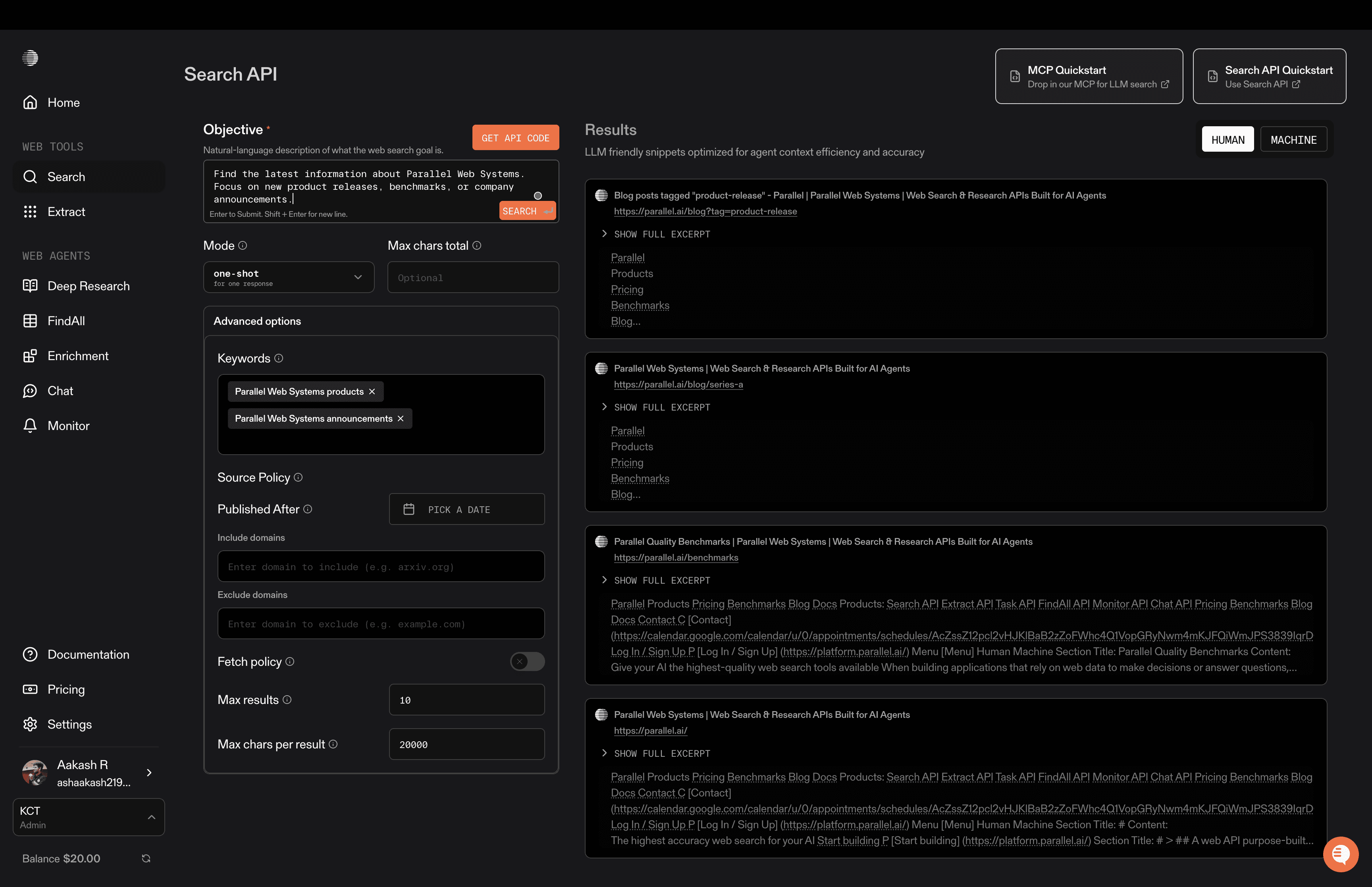
This makes it useful for complex questions that need information from many places at once. It is often used in agent systems and research tools where one question turns into many sub-questions.
Parallel AI Search is mostly used through APIs and agent frameworks. It fits well in workflows where an AI needs to explore multiple angles of a problem quickly.
The main idea is simple: faster answers by searching in parallel instead of in sequence.
Who Parallel AI Search is for: Parallel AI Search is best for developers and teams building agents, research systems, or tools that need to explore many sources at the same time.
Core strengths of Parallel AI Search
Parallel querying: Runs many searches at once instead of one by one.
Good for complex questions: Works well when one query needs many sub-queries.
Agent-friendly: Designed to plug into agent and tool-using workflows.
Fast aggregation: Combines results into a single response quickly.
API-first design: Built mainly for programmatic use.
Pros
Very fast for big questions: Parallel search saves time.
Good for agents: Fits multi-step reasoning systems well.
Scales well: Handles many queries at once.
Cons
Not for casual users: No simple consumer interface.
Needs setup: Best used with technical workflows.
Quality depends on sources: Output depends on what it searches.
5. Perplexity
Perplexity is a conversational AI search engine built for people who want direct answers, not pages of links. You ask a question, and it responds with a clear answer, usually backed by visible sources.
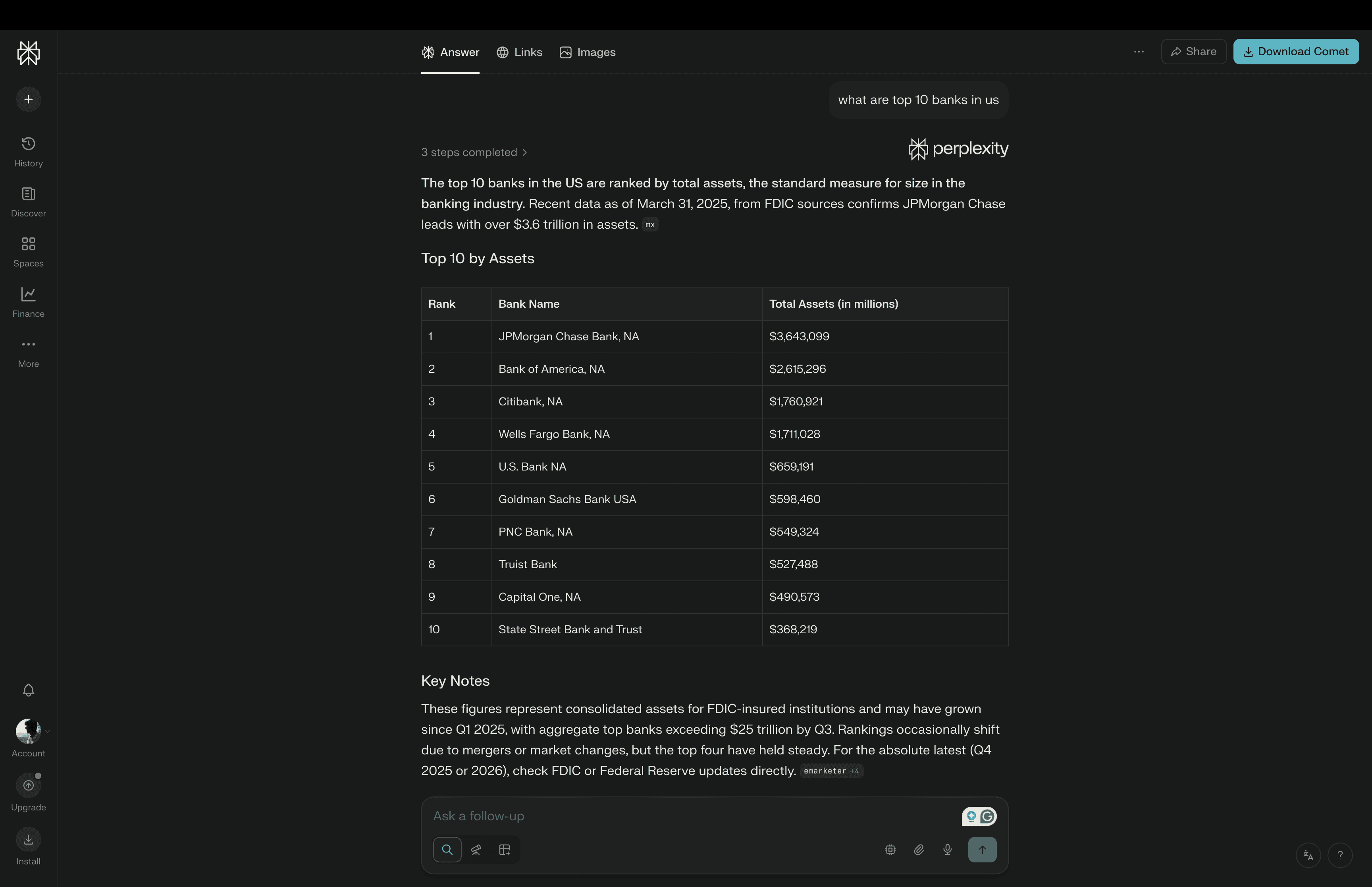
It works like a chat-first search engine. You can ask follow-up questions, go deeper into a topic, or change direction without starting over.
One of Perplexity’s biggest strengths is how it mixes live web search with AI reasoning. It pulls in recent information and turns it into short, readable explanations.
Perplexity also offers different modes, including general search, academic-style research, and focused browsing. Some versions support file uploads and long-context analysis, which makes it useful for working with documents too. It is widely used for learning, writing, research, news tracking, and quick fact-checking.
Who Perplexity is for: Perplexity is best for everyday users, students, writers, researchers, and professionals who want fast answers with clear sources.
Core strengths of Perplexity
Conversational search: Ask naturally and keep the conversation going.
Strong citations: Most answers come with visible sources.
Real-time info: Pulls in recent content from the web.
Multiple modes: Supports general, research, and focused search styles.
Document support: Can work with uploaded files in some plans.
Pros
Very easy to use: No setup, works right away.
Good for learning and writing: Explains topics clearly.
Builds trust: Sources are easy to check.
Cons
Limited control: Not made for deep customization.
Not developer-first: APIs and automation are limited.
Answer depth varies: Some topics get shallow coverage.
6. You search
You search is an AI-powered search engine that focuses on giving users more control over how search works. Instead of a fixed layout, it lets you customize what you see and how results are shown.
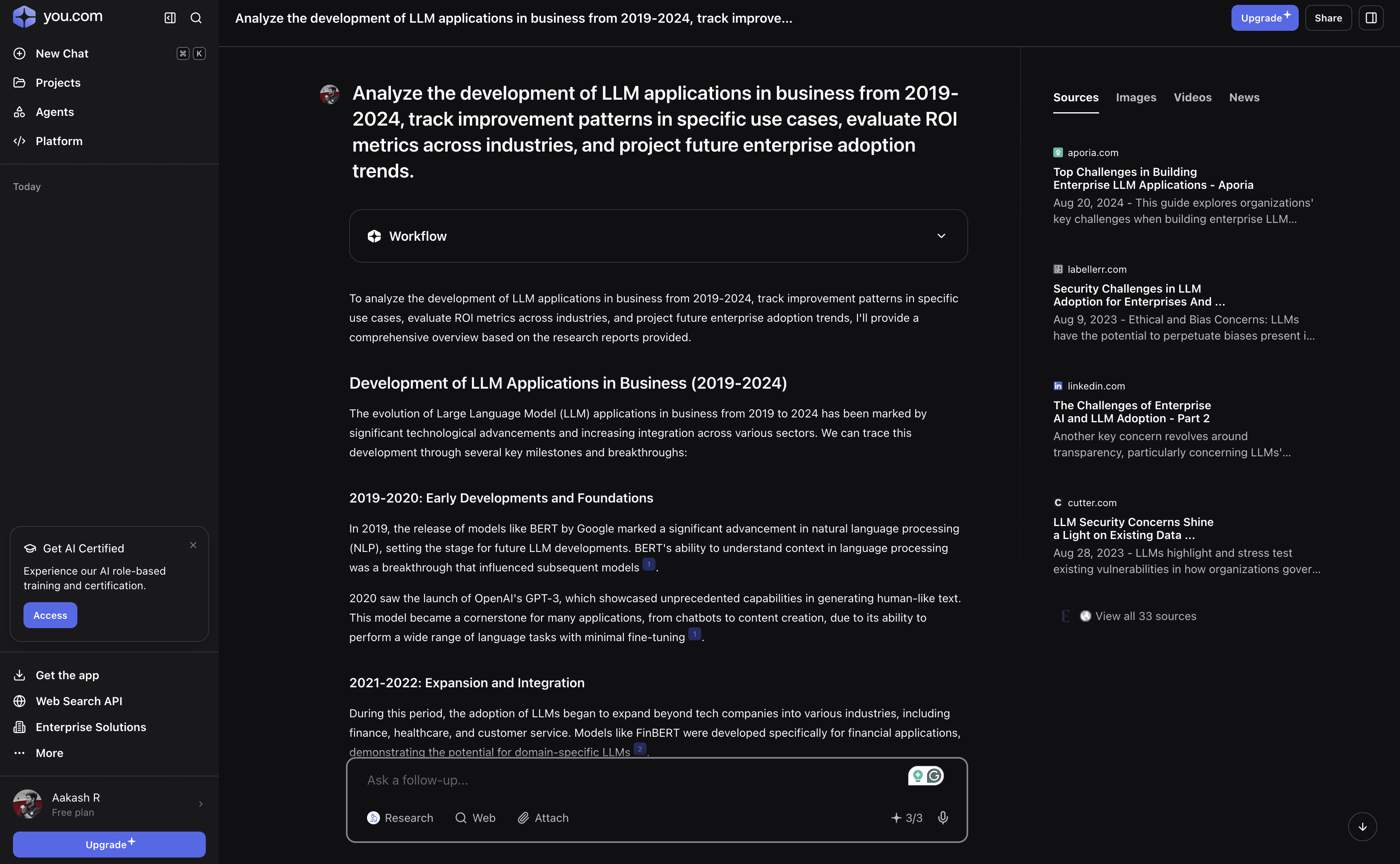
It combines AI answers with regular web results. You can get summaries, chat-style responses, and links on the same page. A big part of You.com is privacy. It avoids heavy tracking and does not depend as much on targeted ads. It also offers different “apps” or modes inside search, such as coding help, writing, research, and general chat, all in one place.
Who You.com is for: You.com is best for users who want a customizable, privacy-focused AI search experience.
Core strengths of You search
Customizable layout: Users can choose how results are displayed.
AI plus web results: Mixes chat answers with links.
Privacy focus: Less tracking and fewer ads.
Multiple apps: Writing, coding, research, and chat in one place.
Good for daily use: Works well as a main search engine.
Pros
User control: You decide how search looks and feels.
Privacy-friendly: Less data tracking than big engines.
Versatile: Useful for many everyday tasks.
Cons
AI quality varies: Some answers are weaker than top AI models.
Can feel busy: Too many options for some users.
Less developer focus: Not built mainly for APIs or automation.
7. Serp (SerpAPI and similar tools)
Serp tools are not search engines for humans. They are tools that let developers pull search results from major search engines in a clean, structured way. Instead of scraping pages yourself, you send a query to a Serp API and get back organized data like links, titles, snippets, images, news, and more.
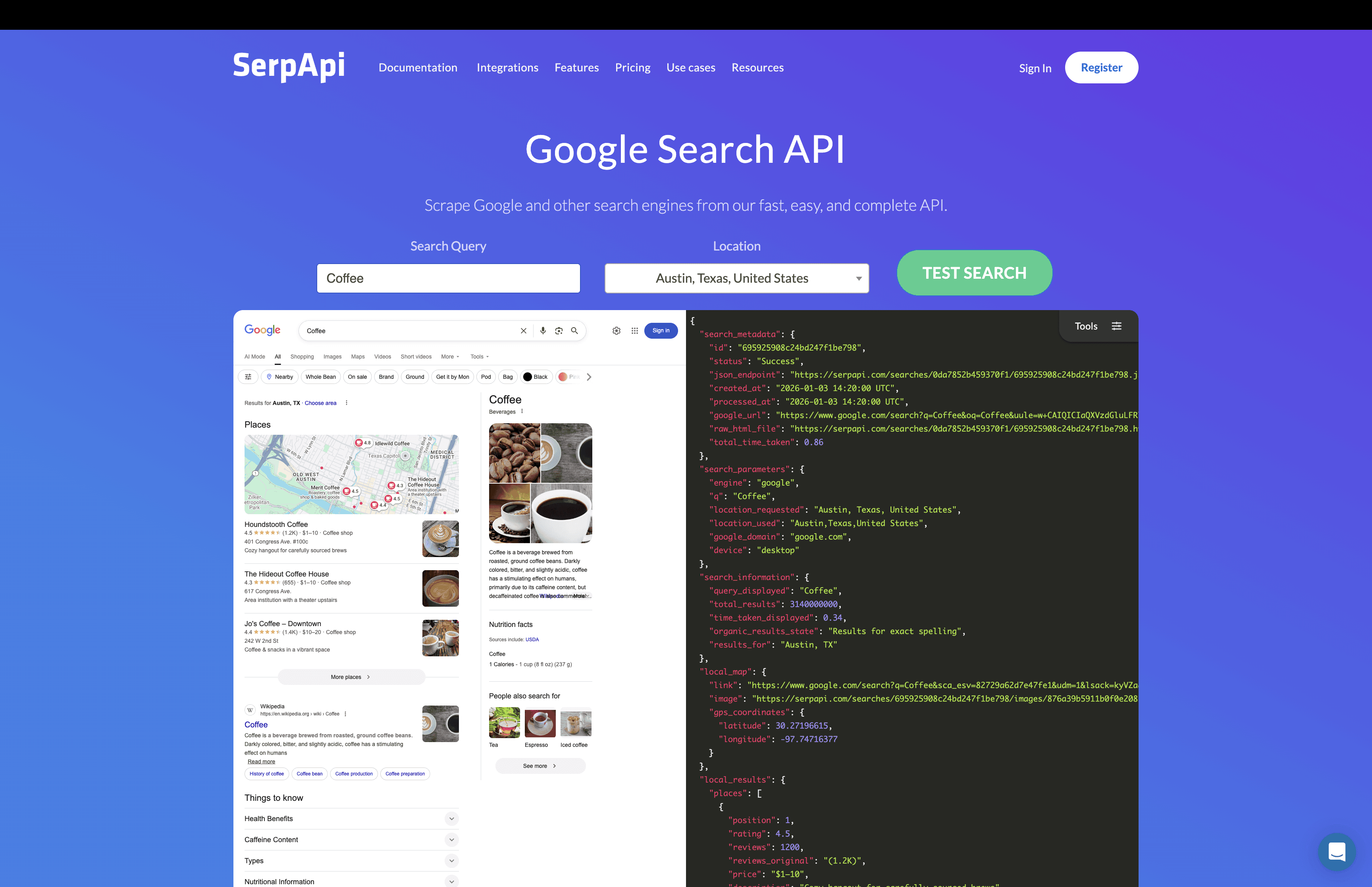
These tools are widely used in analytics, SEO tools, market research, monitoring systems, and AI products that need access to real search results. Serp tools focus on reliability. They handle proxies, captchas, rate limits, and formatting so teams do not have to build and maintain their own scraping systems.
Who Serp is for: Serp tools are best for developers, data teams, and businesses that need large-scale access to search engine results.
Core strengths of Serp tools
Real search engine data: Pulls results from major engines in real time.
Structured output: Returns clean JSON instead of messy HTML.
Scales well: Built for high-volume requests.
Handles scraping issues: Manages proxies, blocks, and captchas.
Good for monitoring: Useful for tracking rankings, trends, and changes.
Pros
Reliable access: No need to build your own scraper.
Works at scale: Handles large workloads smoothly.
Flexible use: Fits analytics, SEO, research, and AI products.
Cons
Not an AI search engine: Just gives raw results, not answers.
Needs processing: You must clean or summarize results yourself.
Can be expensive: High usage increases cost.
8. Brave Search API
Brave Search API is built on Brave’s own independent search index. Unlike many tools that rely on other big search engines, Brave runs its own crawler and index, which gives it more control over data quality and privacy.
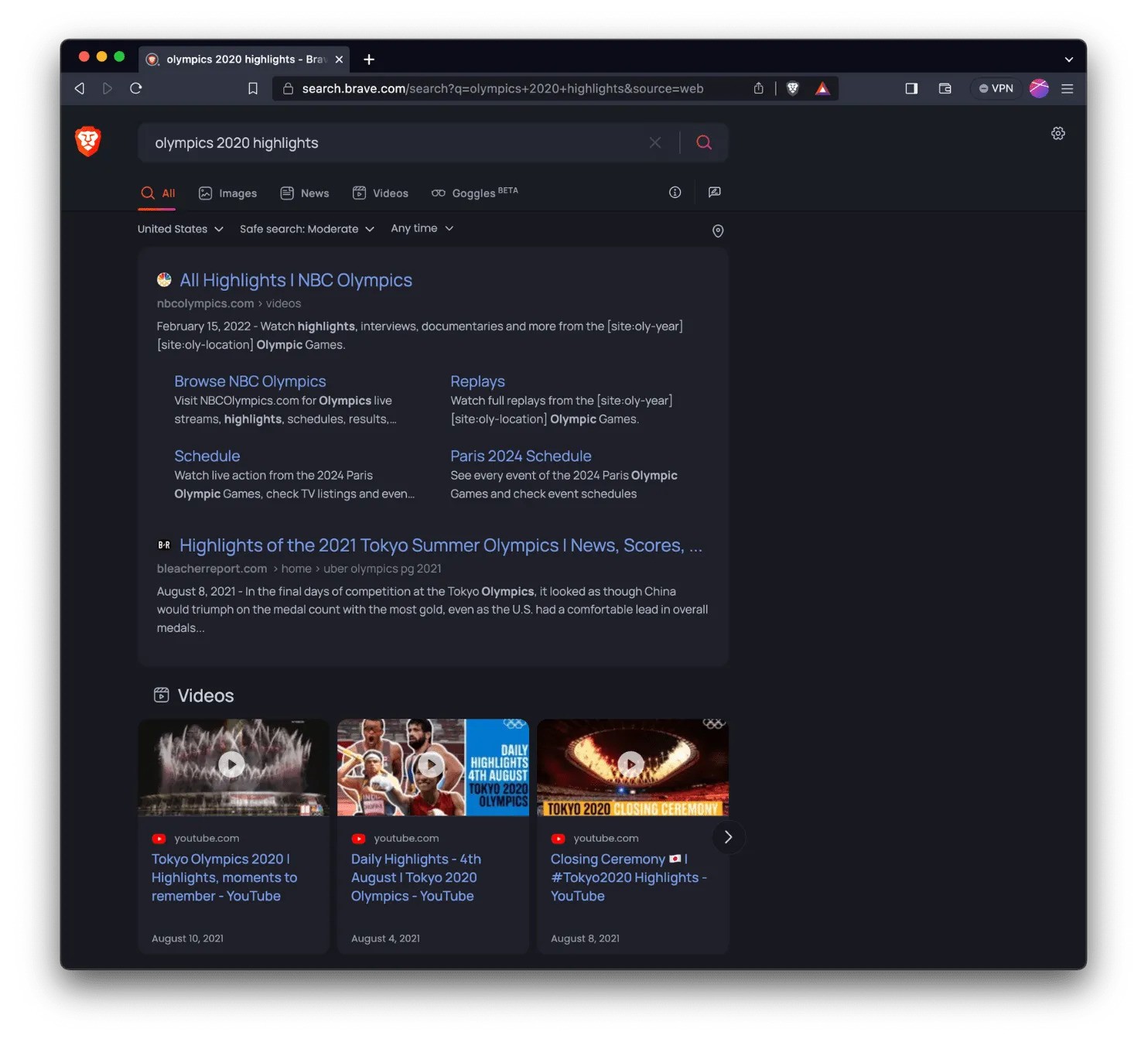
The API is mainly used by developers who want real web search results without relying on Google or Bing. It is often used in AI apps, agents, browsers, and privacy-focused products.
Brave Search also supports AI-style answers on top of its index, but its biggest value is giving clean, direct access to raw search data.
Who Brave Search API is for: Brave Search API is best for developers and teams that want an independent, privacy-friendly web search inside their products.
Core strengths of the Brave Search API
Independent index: Does not depend fully on other search engines.
Privacy-first design: Minimal tracking and data collection.
Good for AI apps: Works well as a search layer for agents and LLM tools.
Structured results: Easy to process programmatically.
Reliable crawling: Continuously updates its own index.
Pros
More control: Not tied to Google or Bing rules.
Privacy-friendly: Strong focus on user data protection.
Good for AI use: Fits well into agent and RAG systems.
Cons
Smaller index: Not as large as big search engines.
Answer quality varies: Depends on index coverage.
Developer-focused: Not built for casual users.
9.Andi Search
Andi is an AI search engine built around a clean, visual, and privacy-first experience. It focuses on presenting answers in a card-style layout with images, links, and short explanations, rather than long text blocks.
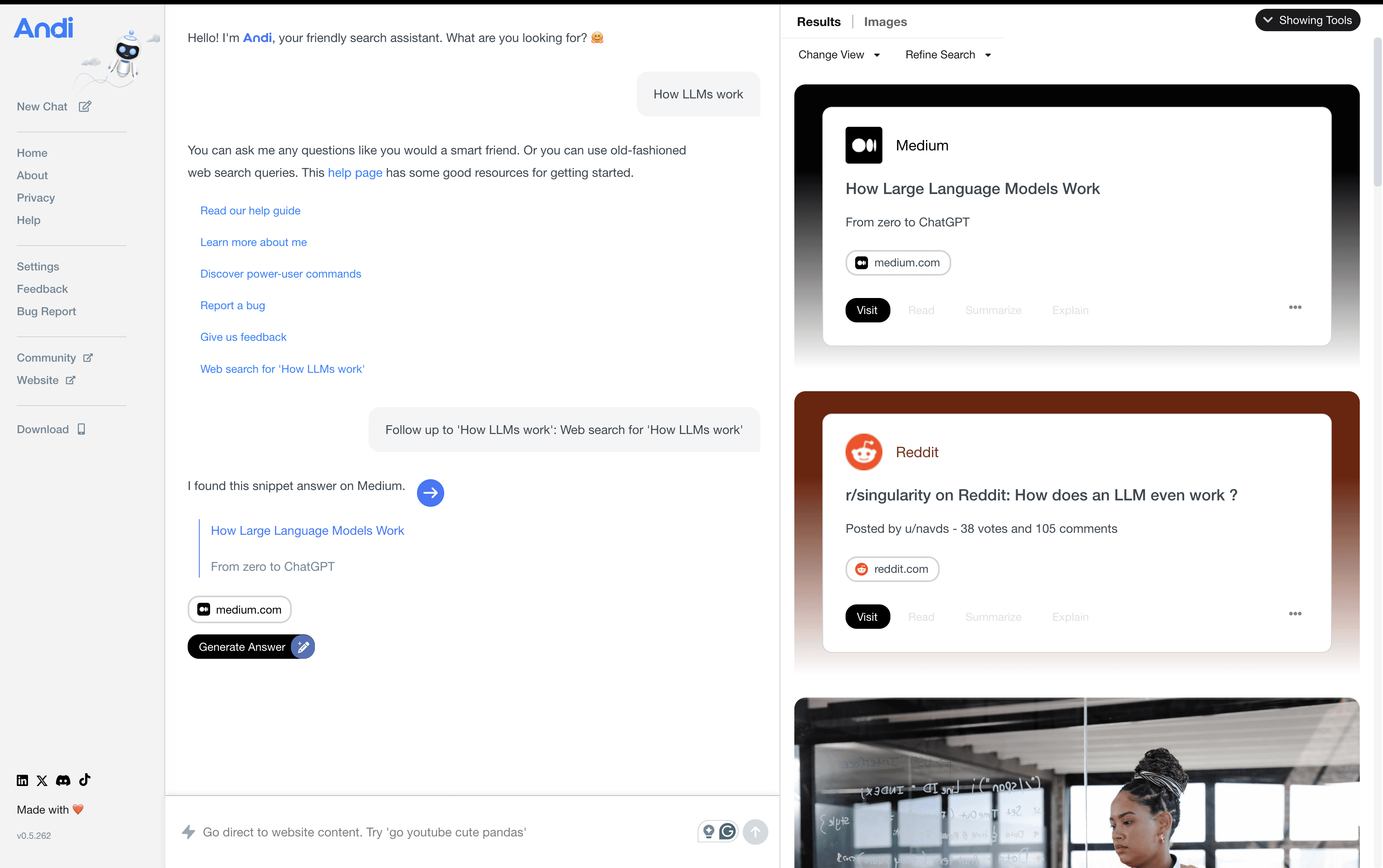
It is designed for people who like to explore topics visually. Search results often include summaries, media, and key points arranged in an easy-to-scan format. Andi also puts strong emphasis on privacy. It avoids heavy tracking and keeps the search simple and lightweight.
It works well for general browsing, learning, and discovery, especially when you want a more visual way to explore information.
Who Andi is for: Andi is best for everyday users who want a clean, visual, and privacy-friendly search experience.
Core strengths of Andi
Visual layout: Results appear as cards with text, links, and images.
Privacy-first: Minimal tracking and data collection.
Easy to explore: Good for browsing and discovery.
Simple interface: Clean and uncluttered design.
AI summaries: Short explanations instead of long pages.
Pros
Very clean UI: Easy on the eyes and simple to use.
Good for exploration: Nice for learning and browsing.
Privacy-friendly: Strong stance on user data.
Cons
Not for deep research: Limited control over results.
No strong developer focus: Not built for APIs or automation.
Answer depth varies: Some topics stay surface-level.
How to Choose the Right AI Search Tool
Picking the right AI search tool depends on what you actually want to do with it. Here are the main things to think about.
Start with your goal: Decide whether you need search for everyday use, learning, research, or building products and agents.
Check how fresh the data is: If you care about news, trends, or fast-changing topics, make sure the tool pulls live or near-real-time information.
Think about control: Some tools are simple and hands-off, while others let you filter sources, tune results, and shape how search works.
Look at privacy: See what data is collected, how long it is stored, and whether you can opt out of tracking.
Plan for cost and scale: A tool that is cheap for light use can get expensive at high volume, so check pricing early.
Closing
AI search in 2026 is about more than finding links. It focuses on giving clear answers, staying current, and saving time.
Some tools are built for everyday users who want quick answers. Others are made for developers, agents, and teams building products. There is no single best option for everyone.
The right choice depends on how you work, what you search for, and how much control you want. Once you are clear on that, picking the right AI search tool becomes much easier.
The tools in this list show where search is heading, and they give a good picture of what modern search looks like in 2026.
Frequently Asked Questions
What makes an AI search engine different from traditional search engines?
AI search engines focus on understanding intent and meaning instead of just matching keywords. Instead of returning a long list of links ranked by ads or SEO tactics, they aim to deliver direct answers, cleaner sources, or structured data. Many are designed to work inside AI systems, agents, or research workflows rather than for casual browsing.
Are these tools meant for regular users or mainly for developers?
It depends on the tool. Products like Perplexity, You.com, and Andi are built for everyday users who want fast answers and easy exploration. Tools like Exa, Tavily, Firecrawl, Serp APIs, and Brave Search API are designed mainly for developers and teams that need search inside AI products, agents, or data pipelines.
Which AI search tool is best for building AI agents or RAG systems?
For agent and RAG workflows, tools like Exa, Tavily, Firecrawl, Parallel AI Search, and Brave Search API are usually the best fit. They offer APIs, structured outputs, and more control over sources, which is important when search results are fed directly into AI models.
Do AI search tools replace Google completely?
Not entirely. AI search tools often replace Google for learning, research, and quick answers. For developers and teams, they can replace scraping or manual search inside products. Traditional search engines still matter for broad discovery and very large indexes, so many people and systems end up using both.